- Analysis tools do not need AI built in to support agentic workflows; they simply need to expose their data through an external scripting interface.
- Even traditional graphical user interface (GUI) applications can be made AI-accessible by publishing their internal object models, allowing agents to query and automate analysis without modifying the core application.
- This approach can often be implemented with surprisingly little engineering effort, leveraging existing scripting technologies and application data structures.
- By exposing structured data rather than adding predefined AI features, users can extend a tool's capabilities through prompts, turning new analyses into workflows instead of product feature requests.
- The application becomes both an interactive viewer and a persistent data server, enabling local data to be parsed once and queried repeatedly across multiple agent sessions while keeping analyst-controlled data local.
The problem with VB6 binaries
VB6 binaries are laid out as a complex file format with embedded metadata. Recovering advanced data embeddings means reimplementing VB6s’ internal file format: the VB header, the object table, and the P-code layout. This is a highly specialized task that takes dedicated tools to do accurately, but not every tool exposes an equivalent programmatic library. The technique in this blog shows how AI agents can automate existing tools and reach deep into the result set.
The recipe
The whole technique comprises three pieces. Any one of them in isolation is interesting, but together they are a new working mode.
The live model
vbdec does not keep its parsed model locked behind its GUI. When a binary is loaded and remote scripting is enabled (Help → Options → Enable Remote Scripting), vbdec registers its central CVBProject object and its main form in the Windows Running Object Table (ROT) under the monikers vbdec.vbp and vbdec.frmMain. The ROT is a system-wide directory of live Component Object Model (COM) objects; any process can look an object up by moniker and receive a reference to the running instance. From a script, that is a single line:
Set o = GetObject("vbdec.vbp")
The variable o can now access the entire parsed project: every form, class, module, declared API, P-code body, control, and string, presented as a navigable object graph. The script is driving the disassembler itself.
Note: For VB6 host applications in particular, this capability can even be forcefully added without source code access.
The contract
A live model is useless to an agent that does not know its shape. vbdec now includes an AI agent support package that helps bridge this gap. The first is the operator briefing (“_claude_vbdec_ai_instructions.txt”) — a short markdown file that tells the agent what vbdec is, how to bind to the ROT, and how the object model is shaped. The second is the proto folder — 90 auto-generated class definitions covering every public class and form vbdec exposes. The agent treats these as the authoritative reference for member names and types. (The original IntelliSensesupport files were also usable for this task.)
The local agent
The third piece is the agent. In this blog, Talos used Claude Code, run locally on the workstation. The user opens a terminal, points the AI at the briefing and prototypes, and simply describes what they would like analyzed. Claude Code then runs multiple .vbs files with cscript and explores the data through iterations. There is no preselected AI integration embedded in vbdec, no upload for the analyst’s binary, and no glue to be maintained as a separate codebase. The agent and disassembler share a machine and file system; analysis occurs locally, with only the model inference requests leaving the workstation.
Whatever capability the agent adds next extends vbdec without any new code in the tool itself, and users are free to select whichever model they prefer.
What the analyst actually does
Next are a couple examples tested against a P-code version of PDFStreamDumper.
Decompile a function
The analyst names a function and asks for a source code reconstruction. The agent pulls the P-code, walks the VB-VM opcode stream, maps each construct to its VB6 equivalent, and produces a source level equivalent with inline comments.
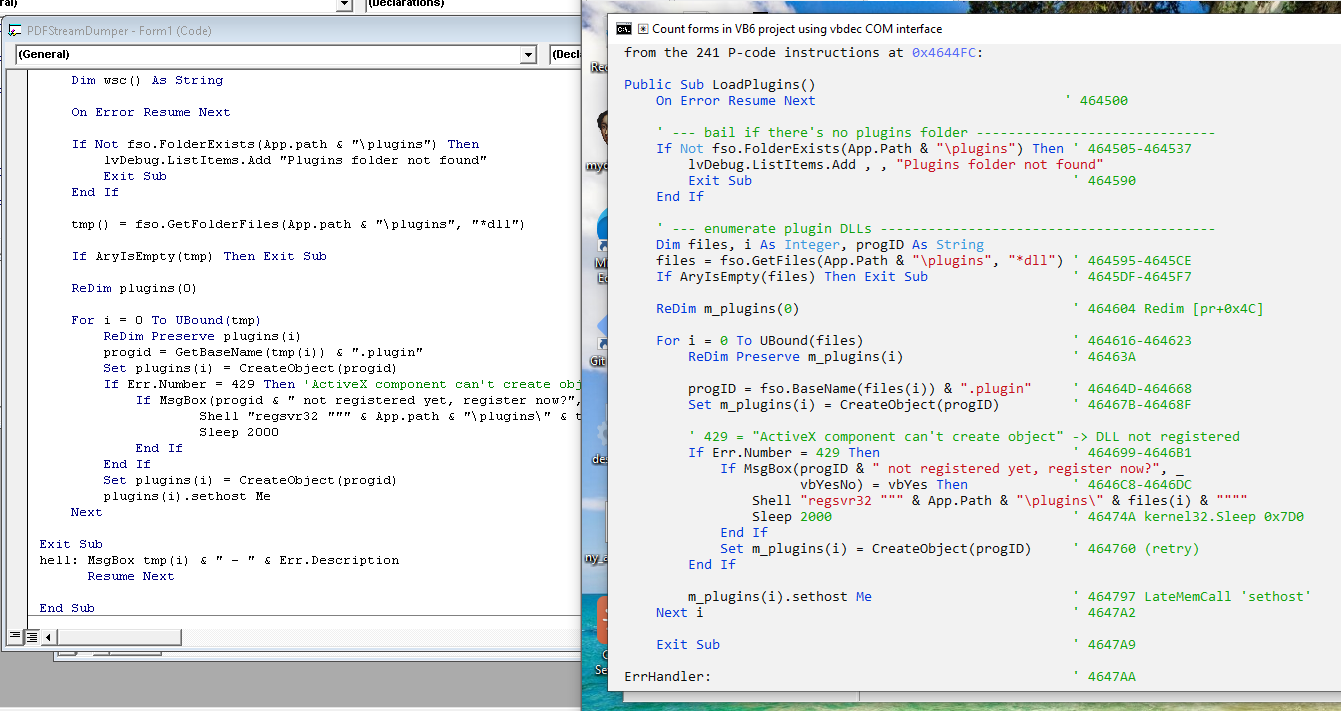
The reconstruction is not byte-identical, but the control flow is substantially recovered with agent comments added in. It is also interesting to note that the AI went into the subfunctions on its own, determined their purpose, and gave them reasonable names to complete its task decompiling the parent. This is usable reverse-engineering output that a human would spend substantial time producing, now scalable and generated in seconds.
Build a call graph
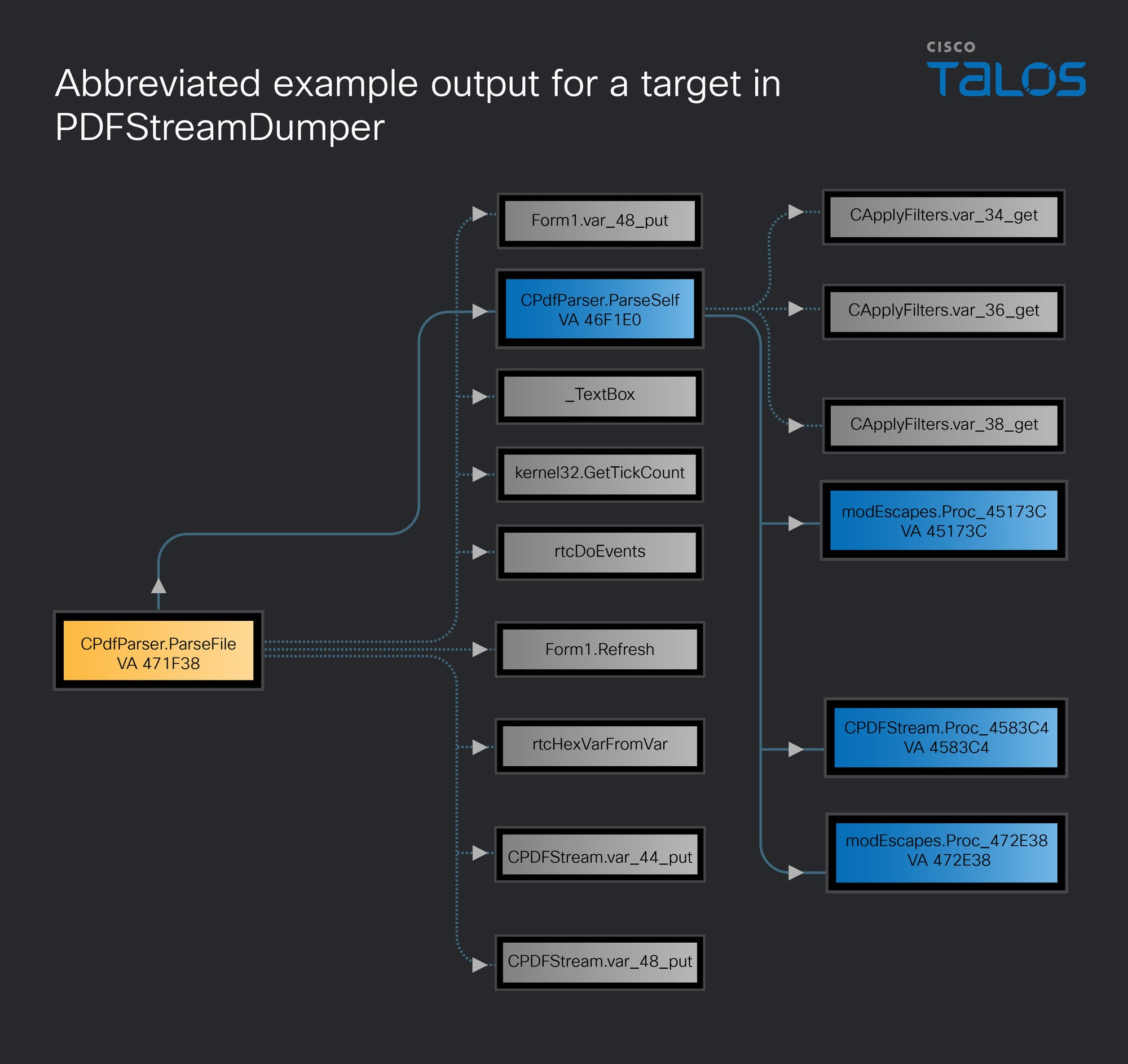
The analyst picks a function and asks for its callees as a Graphviz DOT file. The agent walks each CCodeBody.Disasm, picks out the call opcodes (ImpAdCallI2, VCallHresult, LateMemCall, and others) and emits the DOT graph with depth tracking.
Dump every function to SQL
To test a real automation-heavy use, the agent was next asked to enumerate every function in the binary and dump stats to a SQLite database including address, size, module, instruction count, callees, and external API calls. The agent did this in a single cscript pass over o.CodeObjects, classifying calls with the same rules used in the graph task. For PDFStreamDumper the result is a 600+-row database. Now the database can be explored with simple queries such as:
SELECT display_name FROM functions WHERE api_calls LIKE '%RtlMoveMemory%';
The binary has been transformed from something you must click through into something you can simply query. Whole-program questions that would be impractical by hand become single-line requests.
The three tasks above — decompile, graph, export — used to be features that a tool vendor would have to design, build, and ship as menu items. They are now prompts a user can add on themselves. The capability surface of the tool has decoupled from the feature list of the tool.
Build an opcode reference database
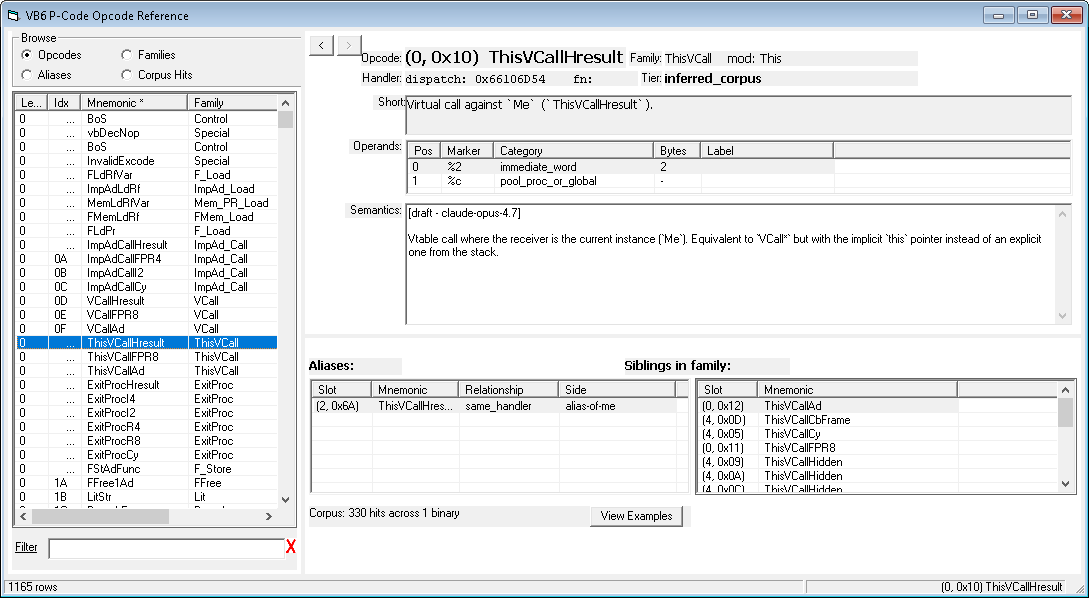
The same recipe scales beyond single analyses to producing reference data. In the next example the agent was tasked with building a complete opcode database for the VB6 P-code interpreter (MSVBVM60.dll; 1,165 dispatch slots). Two tools were coordinated. Vbdec was again used over the ROT to search and analyze actual examples of every opcode from a real binary (PDFStreamDumper). The results were then bolstered utilizing the idalib MCP server to read the actual runtime handler functions in VB runtime itself to verify what each opcode does at the dispatch level.
The results were combined into a SQLite database that includes operand decoding, handler-verified semantics, alias relationships, corpus statistics, and written descriptions for every opcode. Resources such as this could now be fed back into AI agents to produce better P-code decompilation. This corpus of knowledge would be impractical to build by hand, yet was agentically synthesized in a matter of hours.
Application testing
The same mechanism can also be used to test the outputs of the tool itself. An agent pointed at the briefing and prototypes will exercise the real COM surface against actual data. With COM in particular this means there is no mock, no proxy, and no UI automation layers to debug in between.
Method signature drift, type regressions, malformed objects, edge-case P-code, missing members are all easily exposed. The proto files and the briefing get tested alongside the API implementation itself.
What this makes possible
This design pattern generalizes cleanly. Any analysis tool that publishes its internal model to the ROT and ships an operator briefing with prototypes can become a substrate for local agentic automation. The interactive GUI remains available for exploration; the agent handles everything that benefits from being repeatable, exhaustive, or fast.
The architectural move is the part worth carrying away. The author of an analysis tool that holds structured data behind a UI does not have to predict the analyses their users will want.
Publish the model, write the briefing, and hand the keys over to the user. Every user wish list idea now collapses into the same answer: Ask the agent. Tedious analysis can be easily automated.
The local part is valuable as well. Sensitive binaries do not leave the analyst’s machine. There is no API key in the product and there is no service that can be discontinued. The agent is whichever agent the analyst already has. The contract between agent and tool is text files on a file system.
Conclusion
While analysis tools commonly include internal scripting, exposing the application to external automation is what opens them to AI agents. ROT-published COM objects are well-suited to this because they are language-agnostic, process-agnostic, synchronous, and discoverable. Turning the analysis tool into a data server has additional benefits, such as allowing repeat query sessions without itself having to reload and reparse the data set.
While the specific design in this paper was COM-based, any IPC communication protocol could be used. COM and IDispatch are particularly useful here because they are inherently scriptable without requiring additional marshaling or synchronization layers.
Another aspect of this design that is easy to overlook is the utility of having a full GUI for data exploration at the forefront. Data can be explored and verified manually and then scripts written against it for bulk operations. While plugin frameworks have been the traditional solution to automation needs, plugin development is generally quite bulky in practice and often bound to a specific program version.
With this paradigm, the disassembler stops being a place you look at a binary, and becomes a service you ask questions of.